
Reliable Vector Art Conversion Service for Embroidery Digitizing: What to Expect

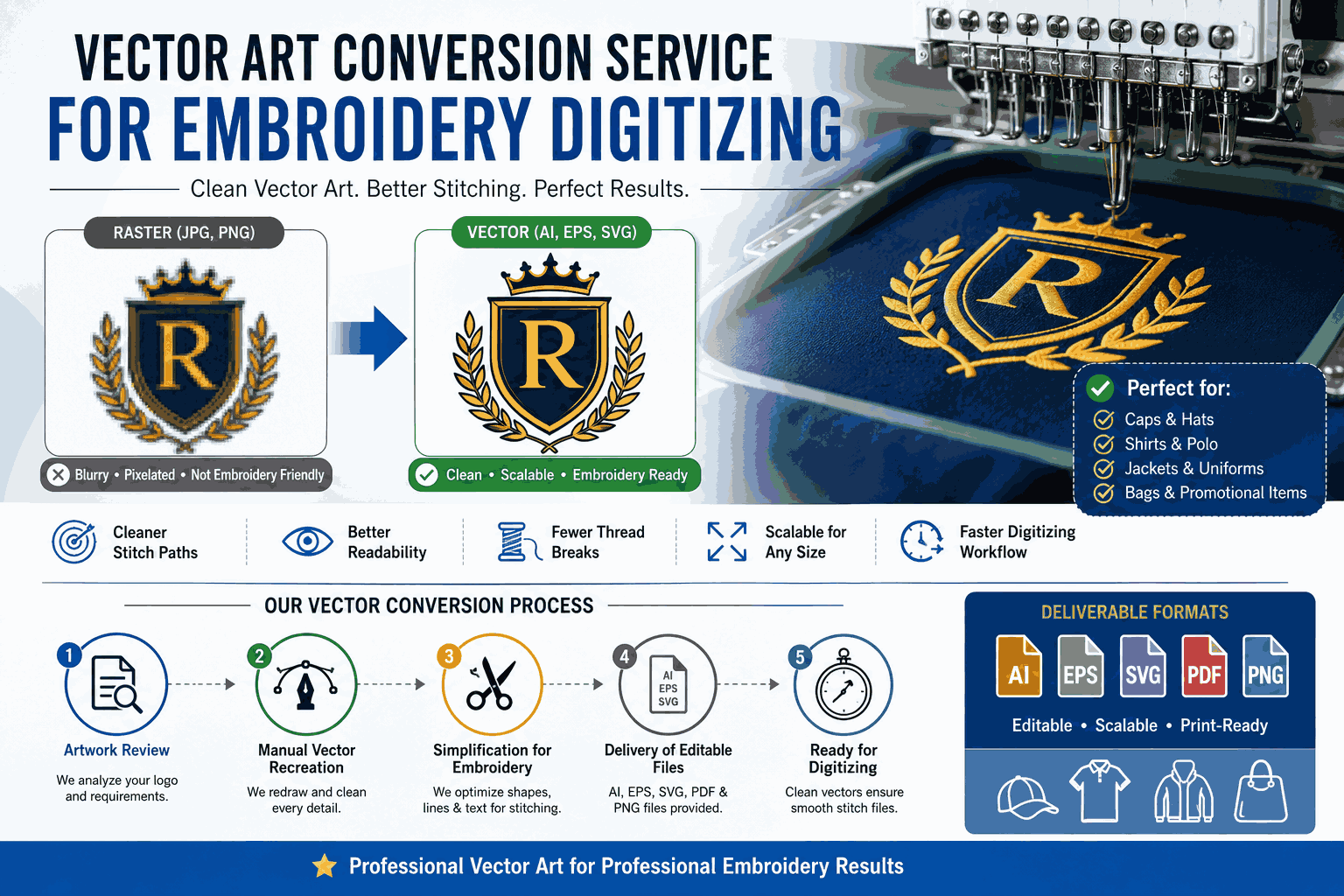
A reliable vector art conversion service plays an important role in embroidery digitizing because embroidery machines require clean, simplified, and properly prepared artwork to produce accurate stitching results.
Many embroidery problems begin with poor-quality logo files, blurry images, or badly traced artwork. Clean vector conversion helps digitizers create smoother stitch paths, cleaner outlines, and more professional embroidery results on hats, shirts, uniforms, jackets, and promotional products.
Main Answer
A reliable vector art conversion service for embroidery digitizing should provide clean, editable, print-ready artwork optimized for embroidery workflows rather than simply converting an image into vector format.
Professional embroidery-focused vector conversion usually includes:
Clean curves and outlines
Simplified shapes
Proper spacing
Readable typography
Balanced line thickness
Reduced unnecessary detail
Editable vector formats like AI, EPS, and SVG
This preparation helps embroidery digitizers create more accurate stitch files while reducing thread breaks, distortion, and production problems.
Detailed Explanation
Why Vector Art Matters for Embroidery Digitizing
Embroidery machines do not interpret artwork the same way screens do.
A logo that looks perfect digitally may stitch poorly because of:
Thin lines
Tiny details
Crowded shapes
Rough vector paths
Poor spacing
Professional vector conversion prepares artwork so embroidery digitizers can build cleaner stitch patterns.
Without clean vector artwork, embroidery often results in:
Uneven stitching
Missing details
Distorted text
Thread bunching
Poor readability
Raster vs Vector for Embroidery
Raster images like JPG or PNG files are made of pixels. When enlarged or processed for embroidery, they may lose detail and create unclear edges.
Vector graphics use mathematical paths that remain clean and scalable.
For embroidery digitizing, vector artwork helps because:
Shapes are easier to trace
Curves remain smooth
Colors are easier to separate
Text becomes more readable
Stitch paths become cleaner
What Makes a Vector Conversion Service Reliable?
Not every vector conversion service understands embroidery requirements.
A reliable service should understand:
Minimum stitch-friendly line thickness
Shape simplification
Small text limitations
Thread behavior
Embroidery readability
Path cleanup
This experience becomes especially important for:
Corporate uniforms
Sports apparel
Caps and hats
Jacket embroidery
Promotional products
Small logo applications
Step-by-Step Guide: What to Expect From a Professional Service
Step 1: Artwork Review
A professional service first evaluates:
Image quality
Detail complexity
Logo size requirements
Embroidery placement
Stitch limitations
If the artwork is too detailed, they may recommend simplification.
Step 2: Manual Vector Recreation
Reliable providers usually avoid relying completely on auto-tracing software.
They manually:
Redraw curves
Clean edges
Rebuild typography
Correct spacing
Remove unnecessary anchor points
This produces cleaner embroidery results later.
Step 3: Simplification for Stitching
Embroidery cannot reproduce every tiny detail.
Professional vector artists often:
Thicken thin lines
Simplify textures
Adjust spacing
Remove tiny shapes
Improve readability
This helps prevent stitching issues.
Step 4: Delivery of Editable Files
Professional services usually provide:
AI
EPS
SVG
Editable PDF
PNG preview files
These formats help embroidery digitizers work more efficiently.
Step 5: Preparation for Digitizing
The vector artwork is then used by the embroidery digitizer to create stitch files such as:
DST
PES
EXP
JEF
The cleaner the vector file, the smoother the digitizing process becomes.
Practical Examples and Real-Life Use Cases
Example 1: Embroidered Company Uniforms
A company wanted embroidered logos on staff polo shirts.
Their original logo came from a low-quality website screenshot.
The first embroidery attempt produced:
Broken lettering
Uneven stitching
Poor readability
After professional vector conversion:
Text became cleaner
Shapes stitched smoothly
Thread paths improved
Uniforms looked more professional
Example 2: Hat Embroidery
A clothing brand wanted small embroidered logos on caps.
The original artwork contained:
Tiny text
Thin outlines
Complex shadows
A professional vector artist simplified the logo for embroidery by:
Removing unnecessary effects
Increasing spacing
Thickening important lines
The final embroidery became much cleaner and easier to read.
Example 3: Sports Team Jackets
A sports team needed embroidered jacket logos.
The original PNG artwork became distorted during digitizing.
After proper vector recreation:
Curves aligned correctly
Colors separated cleanly
Stitch density improved
This reduced production errors across large orders.
How Professional Vector Conversion Improves Embroidery Results
Cleaner Stitch Paths
Smooth vector curves help embroidery software create more accurate stitching routes.
Better Readability
Simplified artwork improves visibility on smaller embroidered designs.
Reduced Thread Problems
Clean paths reduce:
Thread breaks
Overlapping stitches
Distortion
Improved Scalability
The same artwork can be resized for:
Caps
Jackets
Hoodies
Bags
Uniforms
without losing structure.
Faster Digitizing Workflow
Digitizers spend less time correcting poor artwork.
Pros and Cons of Professional Vector Conversion for Embroidery
Pros
Better Embroidery Quality
Improves stitching clarity and consistency.
Easier Digitizing
Digitizers work faster with clean artwork.
Cleaner Small Designs
Important for hats and chest logos.
Editable Artwork
Allows future updates and branding changes.
Long-Term Branding Asset
One clean vector file supports multiple embroidery projects.
Cons
Complex Logos May Need Simplification
Some designs cannot stitch perfectly without adjustments.
Professional Services Cost More
Manual cleanup requires experience and time.
Tiny Text Has Physical Limits
Embroidery machines cannot reproduce extremely small details accurately.
Low-Quality Images Reduce Accuracy
Very blurry source files may require partial redesign.
Common Mistakes Businesses Make
Using Website Screenshots as Final Artwork
Screenshots usually lack the quality needed for embroidery production.
Ignoring Small Text Limitations
Very small lettering often becomes unreadable after stitching.
Choosing Cheap Auto-Trace Services
Automatic tracing may create rough curves and unnecessary vector points that complicate digitizing.
Not Testing Stitch Samples
Always test embroidery samples before approving large production runs.
Expert Tips From Real Embroidery Workflow Experience
Create an Embroidery-Specific Logo Version
Not every digital logo works perfectly for stitching.
Professional brands often maintain:
Full branding logo
Simplified embroidery version
Single-color version
Small-size version
Avoid Extremely Thin Lines
Thin lines may disappear or distort during embroidery.
Vector artists often increase line thickness slightly for better stitching.
Leave Enough Spacing Between Elements
Crowded shapes can merge during stitching.
Proper spacing improves:
Readability
Stitch clarity
Production consistency
Test Different Fabric Types
Embroidery behaves differently on:
Caps
Jackets
Stretch fabrics
Heavy cotton
Polyester
Always test before mass production.
How Much Does Vector Conversion for Embroidery Usually Cost?
Pricing depends on:
Artwork complexity
Detail level
Manual recreation needs
Typography rebuilding
Simplification requirements
Simple logos usually cost less than:
Mascot illustrations
Detailed badges
Complex emblem artwork
Pricing varies by provider and region, so businesses should verify current costs directly before ordering.
Very low-cost services may rely heavily on automated tracing with limited cleanup.
Conclusion
A reliable vector art conversion service is an important foundation for successful embroidery digitizing. Clean vector artwork improves stitch quality, simplifies digitizing workflows, and helps businesses create more professional embroidered products.
Whether you are producing uniforms, hats, jackets, promotional products, or branded apparel, properly prepared vector artwork reduces production issues and improves final embroidery quality.
Before hiring any service, review portfolio quality carefully, ask about manual cleanup, confirm embroidery experience, and test stitch samples before large production runs. A professionally created vector file becomes a long-term asset for embroidery, printing, branding, and future design projects.
FAQs
1. Why do embroidery digitizers prefer vector files?
Vector files provide clean shapes and smooth curves that are easier to convert into accurate stitch paths.
2. Can PNG files be used for embroidery digitizing?
Sometimes, but clean vector artwork usually produces much better embroidery results.
3. What file format is best for embroidery vector artwork?
AI and EPS are commonly preferred because they remain editable and scalable.
4. Why does small embroidered text often look bad?
Embroidery machines have physical stitching limitations, especially with tiny lettering and thin details.
5. Does vector conversion automatically create embroidery stitch files?
No. Vector conversion prepares the artwork, while embroidery digitizing creates machine stitch files like DST or PES.